
Inventory tracking for handmade businesses
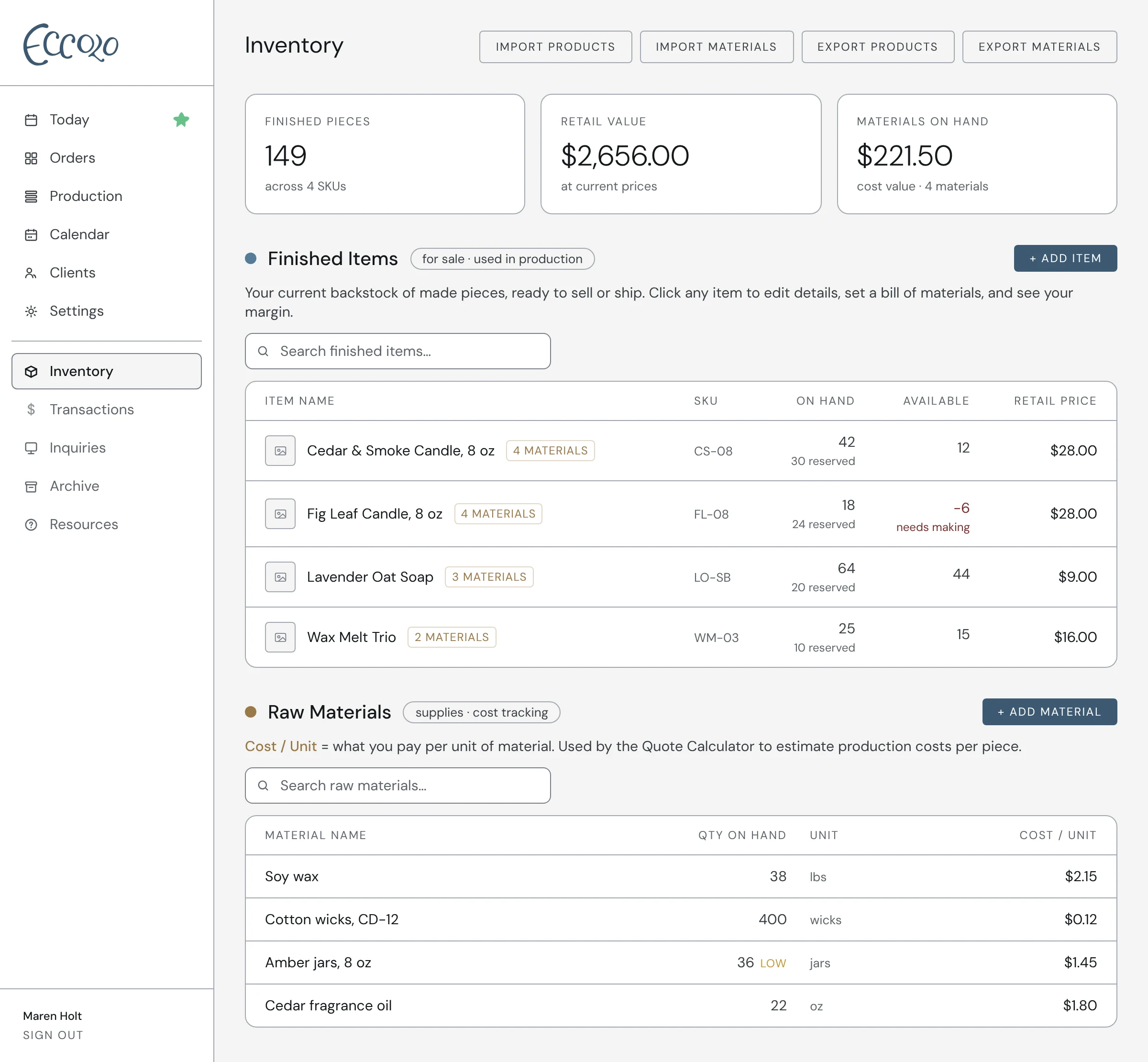
Eccolo tracks your finished pieces and raw materials in one place. Orders set pieces aside, production runs refill the shelf, and Available always tells you what’s actually free to sell.
How it works
- 01Finished pieces and raw materials, each in their own list
- 02On hand, reserved and available, so you never promise the same piece twice
- 03Short on stock? Eccolo shows how many you still need to make
- 04Low stock alerts on your Today list
- 05Bills of materials, so making a piece uses up its materials
- 06Import your current stock list from a spreadsheet
Questions
Why does it say none are available when my shelf is full?
Those pieces are already set aside for active orders or production runs. Click the count on the item to see which ones are holding them.
What happens if an order needs more than I have?
Available goes negative and turns red. That number is how many you still need to make, and it shows up on your Today list until you’ve made them.
Can I import my inventory?
Yes. Use the CSV import on the Inventory page to bring in your finished items or raw materials from a spreadsheet. Studio holds up to 100 of each; Studio Pro has no limit. Not sure how to set up the file? Download the template from the import window, replace the example rows with your own, and upload it. Blank cells are left alone on items you already have, and any row with something that isn’t a number where a number should be is listed for you to fix instead of being imported.