
Production runs for restocks, markets and busy seasons
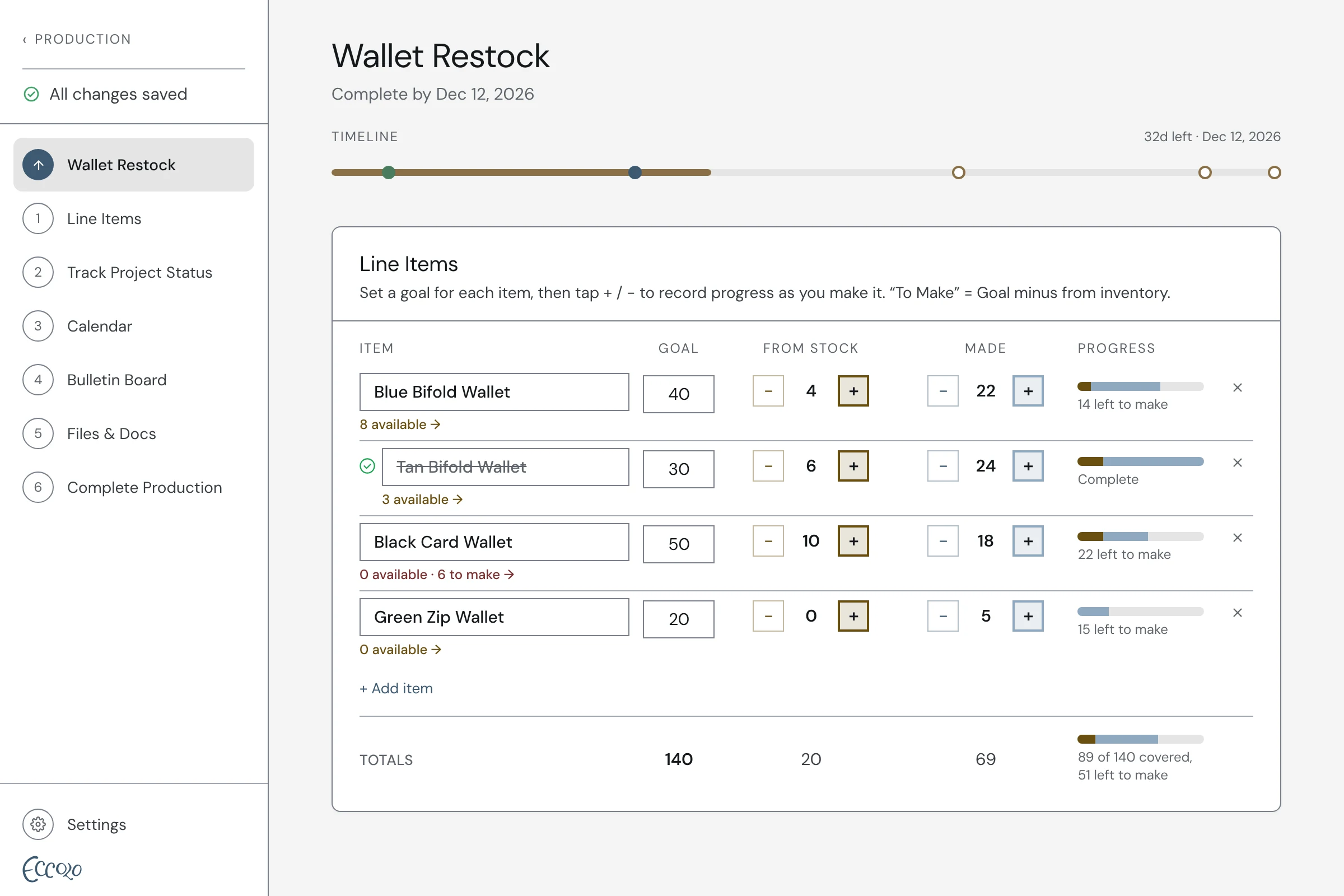
A production run is a batch of making with a goal and a deadline, like 50 wallets for a holiday market or a web shop restock. Pull what you already have from stock, log each new piece with Made +, and watch the bar fill as you get closer to the goal.
How it works
- 01Set a goal and a deadline for every item in the run
- 02Pull pieces you already have from stock, so you only make what’s missing
- 03Tap Made + for each piece and watch the progress bar fill
- 04Raw materials come off your stock automatically as you make
- 05Phases, notes, files and a day-by-day make log for the run
- 06When it’s done, add what you made to your finished inventory
Questions
What’s the difference between an order and a production run?
An order has someone on the other end: a wholesale buyer, a commission or a custom request, usually with a deposit and a due date. A production run is making for your own shelves: restocking your web shop or studio, getting ready for a market, or building stock for a busy season. Both use the same inventory.
Do materials come off automatically?
Yes. Give a finished piece a bill of materials, say 1 sq ft of leather and a few yards of thread per wallet, and every Made + takes those materials out of stock.
Can I see production next to my orders?
Yes. Production deadlines and phases sit on the same calendar as your orders, so you can see everything your studio has on the go.